SEO (Search Engine Optimization) is basically the work of making your site easy to find, easy to understand, and worth ranking. Not by tricking Google, but by building something that genuinely answers what people are searching for. Google’s own guidance frames SEO as “taking the next step” beyond being indexable and improving your site’s presence in search.
A lot of folks treat SEO like a bag of hacks. The problem is those “hacks” age like milk. The stuff that lasts is boring in the best way: solid structure, helpful content, and a technically clean site.
The 3 pillars of SEO (the simple mental model)
1) Technical SEO (can Google crawl and understand your site?)
If Google can’t reliably find your pages, the rest doesn’t matter. Crawling and indexing are literally the gateway to showing up in search.
What technical SEO includes:
- Site architecture and internal linking
- Indexing controls (robots.txt, noindex, canonicals)
- Speed, mobile friendliness, accessibility
- Clean URLs, redirects, duplicate content cleanup
- Structured data when it fits (FAQ, product, organization, etc.)
2) On-page + Content (does your page satisfy the search intent?)
This is where rankings are earned. Google says their ranking systems aim to prioritize helpful, reliable, people-first content, not content written just to manipulate rankings.
What that looks like in real life:
- Clear page purpose (one page, one job)
- Specific answers, not fluffy marketing paragraphs
- Proof (examples, screenshots, case studies, pricing clarity, FAQs)
- Good headings and scannable structure
3) Authority (why should Google trust you over similar pages?)
Authority is mostly built through:
- Quality backlinks (earned, not spammed)
- Brand mentions, citations (especially local)
- Consistency and depth over time
Think of it like reputation. You can’t fake it forever.
A practical SEO process you can actually follow
Step 1: Set the foundation (Day 1 stuff)
- Set up Google Search Console
- Submit your sitemap
- Make sure your key pages are indexable (no accidental “noindex”)
- Fix obvious crawl errors
Search Console is also where you’ll learn what queries you’re showing up for and which pages are getting impressions.
Suggested image placement: Use the Search Console performance screenshot (carousel image 1) under this section.
Step 2: Keyword research (but do it the right way)
Keyword research is not “find the highest volume keyword and spam it everywhere.”
A better approach:
- List your main services or topics
- Find how people actually phrase the problem (questions, comparisons, “near me,” “cost,” “best”)
- Group keywords by intent:
- Informational: “how to…”
- Commercial: “best X for Y”
- Transactional: “buy,” “book,” “pricing”
- Map one primary intent to one page (don’t make 5 pages compete for the same query)
Suggested image placement: Use the keyword spreadsheet image (carousel image 2) next to a short “keyword map” explanation.
Step 3: Build a site structure that doesn’t fight you
A clean structure makes SEO easier and user experience better.
Basic structure that works for most sites:
- Homepage
- About (trust story)
- Services (one main page + separate service detail pages if needed)
- Portfolio / Case studies (proof)
- Blog / Insights (long-term traffic engine)
- Contact / Book
Internal links matter because Google uses links to discover pages and understand relevance, and Google recommends making links crawlable and using descriptive anchor text.
Quick internal linking rules:
- Link from high-traffic pages to money pages
- Use descriptive anchors (not “click here”)
- Avoid navigation that depends on weird JS-only links
Step 4: On-page SEO (optimize what’s on the page)
For every important page, nail these:
- Title tag: Clear + specific (include the main intent)
- Meta description: Not a ranking factor, but helps clicks
- H1: One per page, matches the topic
- Headings (H2/H3): Make the page skimmable
- Images: Compressed + descriptive alt text
- FAQ section: Great for matching long-tail questions
If you do nothing else, do this: write pages that answer the question better than anyone else, faster.
Step 5: Technical cleanup (the unsexy part that wins)
This is where sites quietly lose traffic.
Technical checklist:
- HTTPS everywhere
- Fix 404s and redirect chains
- Canonicals correct (especially ecommerce/blog tags)
- Sitemap is valid and updated
- No duplicate content mess (printer pages, parameters, thin tag pages)
Speed and responsiveness matter too. Google replaced FID with INP as the Core Web Vitals responsiveness metric (effective March 2024), so responsiveness is now measured differently than it used to be.
Suggested image placement: Use the “technical audit checklist” image (carousel image 3) as a visual break.
Step 6: Content strategy (how to get traffic that converts)
Blogging only works when it’s tied to real intent.
Content that usually performs:
- “How much does X cost?” (pricing transparency content)
- “X vs Y” comparisons
- “Best X for Y” (with honest pros/cons)
- Step-by-step guides
- Case studies and breakdowns of results
A simple content system:
- 2 high-intent posts per month
- Update 2 older posts per month
- Add internal links every time you publish
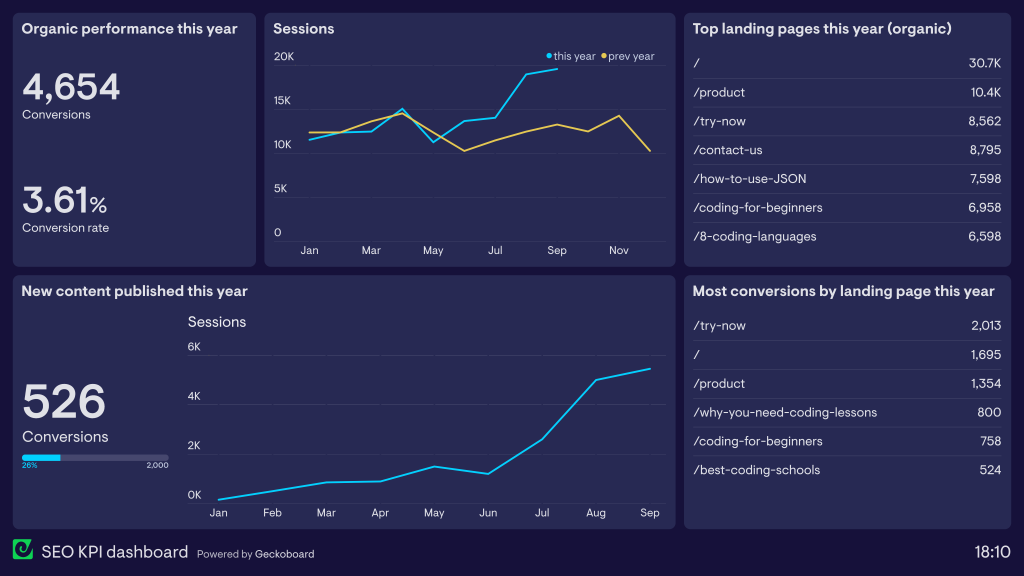
Step 7: Measure what matters (and don’t panic weekly)
SEO is not instant. Track the signals that show direction:
- Search Console: impressions, clicks, average position, queries
- Analytics: organic sessions, engaged sessions, conversions
- Conversions: form fills, calls, bookings, purchases
Suggested image placement: Use the dashboard image (carousel image 4) in this section.
A clean “SEO starter checklist” you can steal
- Search Console + sitemap submitted
- Core pages indexable
- Clear site structure + internal links
- Title tags and H1s done on key pages
- 1 page = 1 intent (no cannibalization)
- Images compressed + descriptive alt text
- Technical errors cleaned up (404s, redirects, canonicals)
- A content plan tied to customer questions